
Postalytics has deep HubSpot integration to assist marketers with several common use cases that automate the direct mail sending and tracking process. The following HubSpot integration help docs are designed to help you in setting up the various integration points and in configuring direct mail campaigns.
What Versions Of HubSpot Are Required?
The direct integration of Postalytics and HubSpot Contacts (reviewed in this section) requires access to HubSpot Lists and/or Workflows.
Lightning fast List Import integration works with HubSpot Contact Lists – HubSpot CRM (all plans, including Free).
Automated Triggered Drip Campaigns works with HubSpot Marketing Automation (Contacts) – Marketing Hub Professional (or higher) required.
What If I Don’t Have The Required HubSpot Level?
You can still use Postalytics! You can easily export your contacts from HubSpot to .CSV files that you import to Postalytics. You can also use our Zapier Integration to trigger mailings from other HubSpot products.
What Can I Do With The HubSpot/Postalytics Integration?
There are several integration possibilities with HubSpot that can help to created automated workflows and data sharing with Postalytics. Postalytics and HubSpot both support the Oath 2.0 authentication standard for fast, secure and simplified integration.
Here you’ll learn how to:
- Import Smart and Static Lists from HubSpot for Postalytics Smart Send Campaigns
- Sync direct mail delivery and response status codes for each campaign into HubSpot Contacts as Custom Properties
- Send triggered direct mail from HubSpot using Workflows and Triggered Drip Campaigns
How To Setup The Postalytics HubSpot Integration
Integrations allows you to create, view and manage your integrations with HubSpot and other tools. This page allows you to easily keep track of all your integrations and the key information for each one. You can also access the Postalytics tracking code, a snippet of Javascript that you put in your landing pages for Postalytics to track and personalize the online response to your mailing.
Note – you can set up multiple integrations for multiple HubSpot accounts.
Get Started
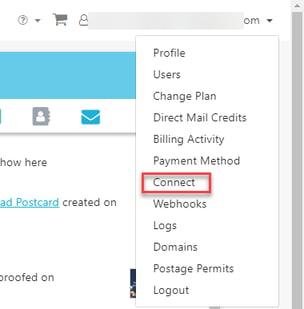
To get started, click ‘ Connect’ under your user name:
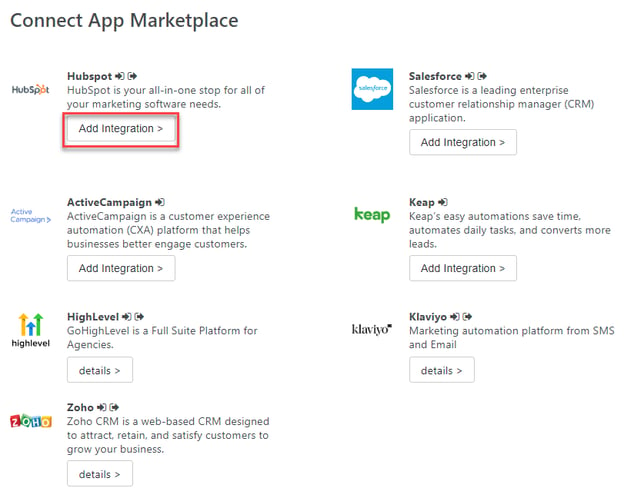
Then click ‘Connect App Marketplace from the Integrations page:

Add A New HubSpot Integration
Postalytics utilizes HubSpot’s new authentication method for integration to maximize your data security. OAuth 2.0 allows a user to authorize Postalytics to work specifically with tools in your HubSpot account, designated by the authorization scopes you set.
Click ‘Add Integration’ under the HubSpot icon.
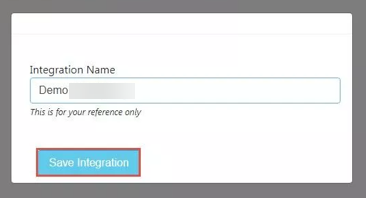
Give the integration an easily recognized name and click on Save Integration.
*IMPORTANT* The articles that follow this assume that you’ve already configured your authentication between Postalytics and HubSpot. If you haven’t, please complete this first before proceeding with building out your integrated campaigns.